Set up Bank of America transaction alerts
-
Sign in to Bank of America
Open bankofamerica.com (opens in a new tab) and log in to your account.
-
Open Alert settings
Go to Profile & Settings, then select Alert settings.
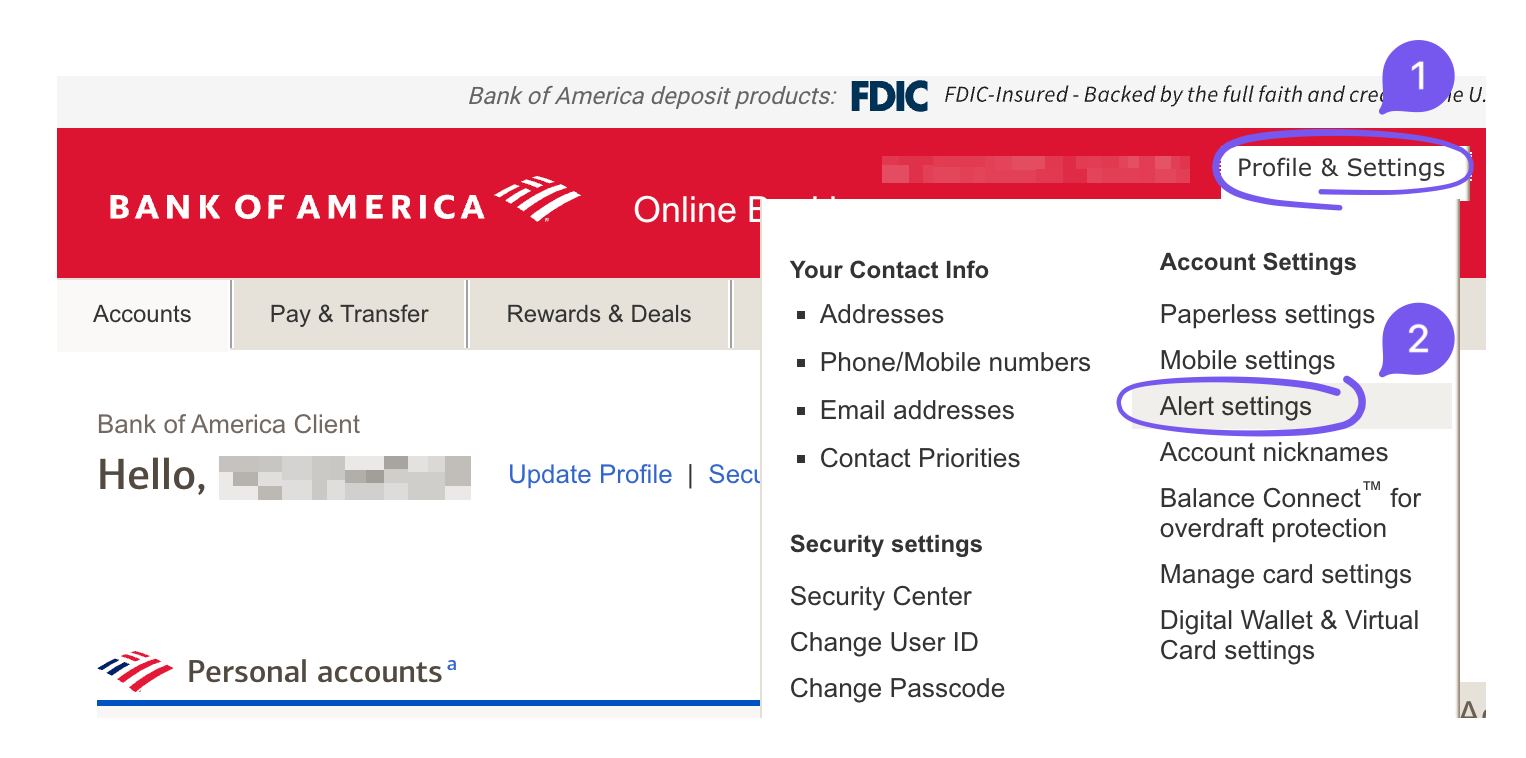
Profile & Settings → Alert settings. -
Choose your credit card
Under View Alerts for, select the credit card you want alerts for.
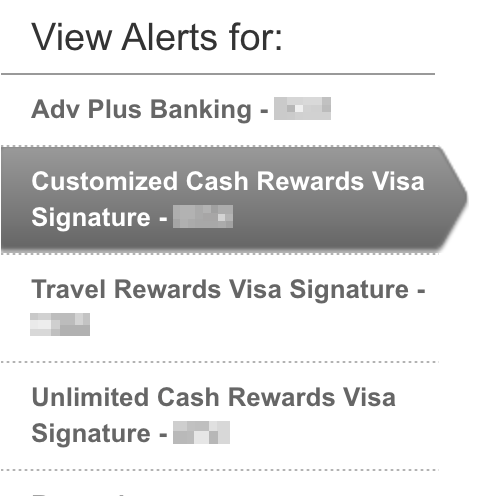
Choose your credit card from the account list. -
Turn on purchase emails
Find Credit card charge over $. Enter 0.01, check the box next to your email address, and switch the alert On. This requests an email for purchases above one cent.

Set the amount to 0.01, select your email, and turn the alert On. -
Turn on refund and credit emails
For Credit received on credit card, check your email address and switch the alert On. Meli can automatically import refund emails, so you can see money coming back without entering it yourself.

Select your email and turn credit alerts On. Repeat both settings for each card you want to track.
You’re all set!
Bank of America will now email you about purchases and credits. Connect your inbox to Meli to automatically import and categorize your spending.
New here? Select “Meet Meli” to learn more.
Common questions
How do I get Bank of America email alerts for small purchases?
In Alert settings, select your credit card and set Credit card charge over $ to 0.01. Check your email address and turn the alert On. This requests emails for purchases above one cent.
How do I receive Bank of America refund alerts?
For your selected card, find Credit received on credit card. Check your email address and turn the alert On. These emails let you track credits, including merchant refunds.
Why am I not receiving transaction alerts?
Check the selected card, purchase threshold, email checkboxes, and On switches for both alert types. Confirm that the selected email address is correct and check your spam folder. If alerts still do not arrive, contact Bank of America through its website or app.
Do I need to enable alerts for each card?
Yes. Select each credit card under View Alerts for and repeat the purchase and credit email settings.
Do I need Meli to receive Bank of America alerts?
No. Bank of America sends the emails directly to you. Connect that inbox to Meli if you’d like supported alerts to automatically become organized spending and refund records on your Mac.
Screenshots from the Bank of America website, September 14, 2026, showing a Customized Cash Rewards Visa Signature card. Menus and available alerts may vary by account. Meli is independent and is not affiliated with or endorsed by Bank of America. Bank of America names and screenshots belong to their respective owners.