 Meli
Meli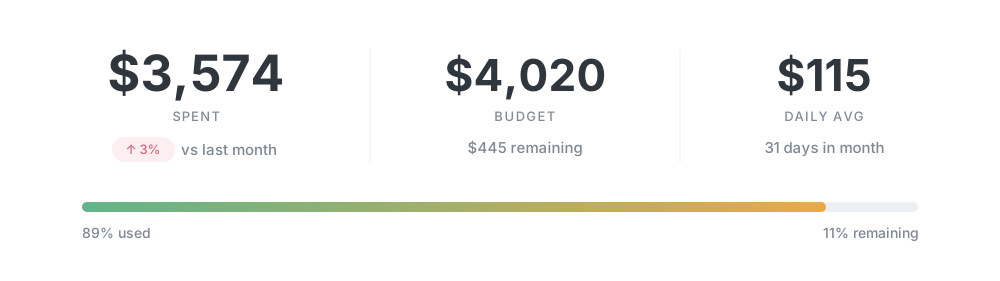

You’re in control
See why. Correct it once.
Meli explains its category choices and applies them automatically only when confident. Change a category, and Meli remembers your choice for that merchant.
Meli turns credit card alert emails into a private, real-time view of your spending, automatically categorized and explained.
No bank login. No aggregators. On your Mac.
14 days of Pro free. No card required. Then keep Lite free, or upgrade to Pro.
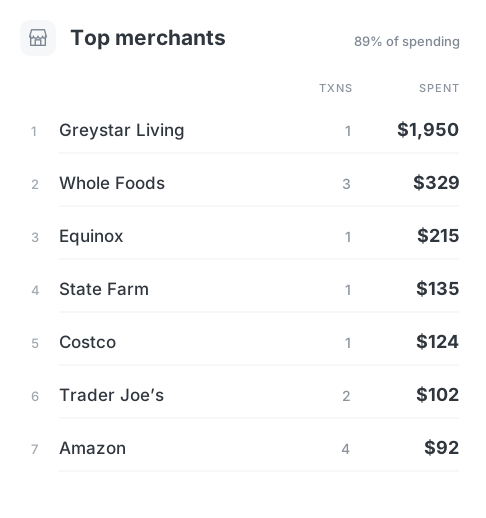
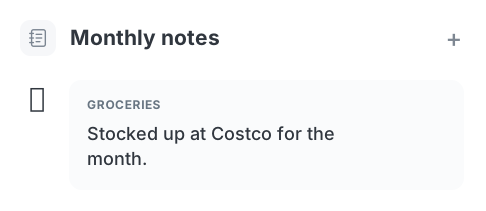
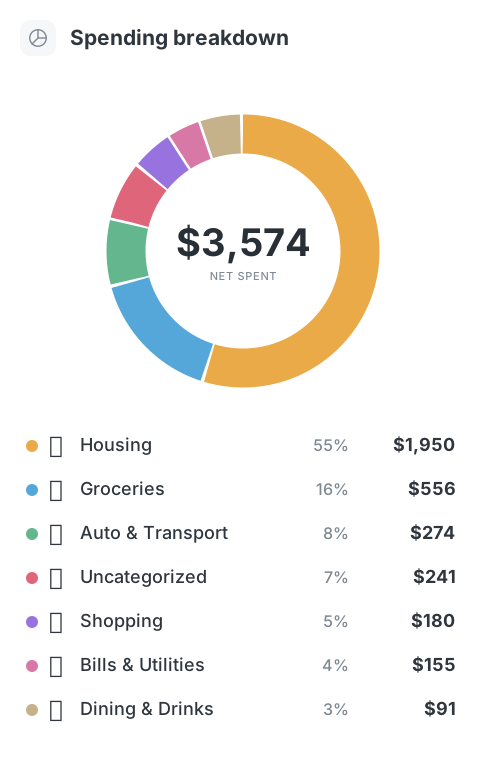
See your spending by category, top merchants, notes, and budget progress in one clear monthly view.

Meli imports your transactions from the alert emails your bank already sends. No bank login, no Plaid.
Requires a Mac with macOS 14+.
Emails from your bank about purchases and refunds.
What are transaction alerts?One-click sign-in with Google or Microsoft. IMAP works too.
Purchases appear as the alerts arrive, already categorized.
Meli imports supported transactions in real time as their alerts arrive. Your spending stays up to date throughout the day, without manual entry.
Meli automatically categorizes purchases as they arrive. Correct it when needed, and your spending picture gets better over time.
Meli explains its category choices and applies them automatically only when confident. Change a category, and Meli remembers your choice for that merchant.
Add tags and notes, rename merchants, or assign categories to matching transactions. Set your rules once, and Meli takes care of the repeats.
Meli turns everyday purchases into a clear picture of your spending over time. Compare months, follow categories, and spot changes you’d miss transaction by transaction.

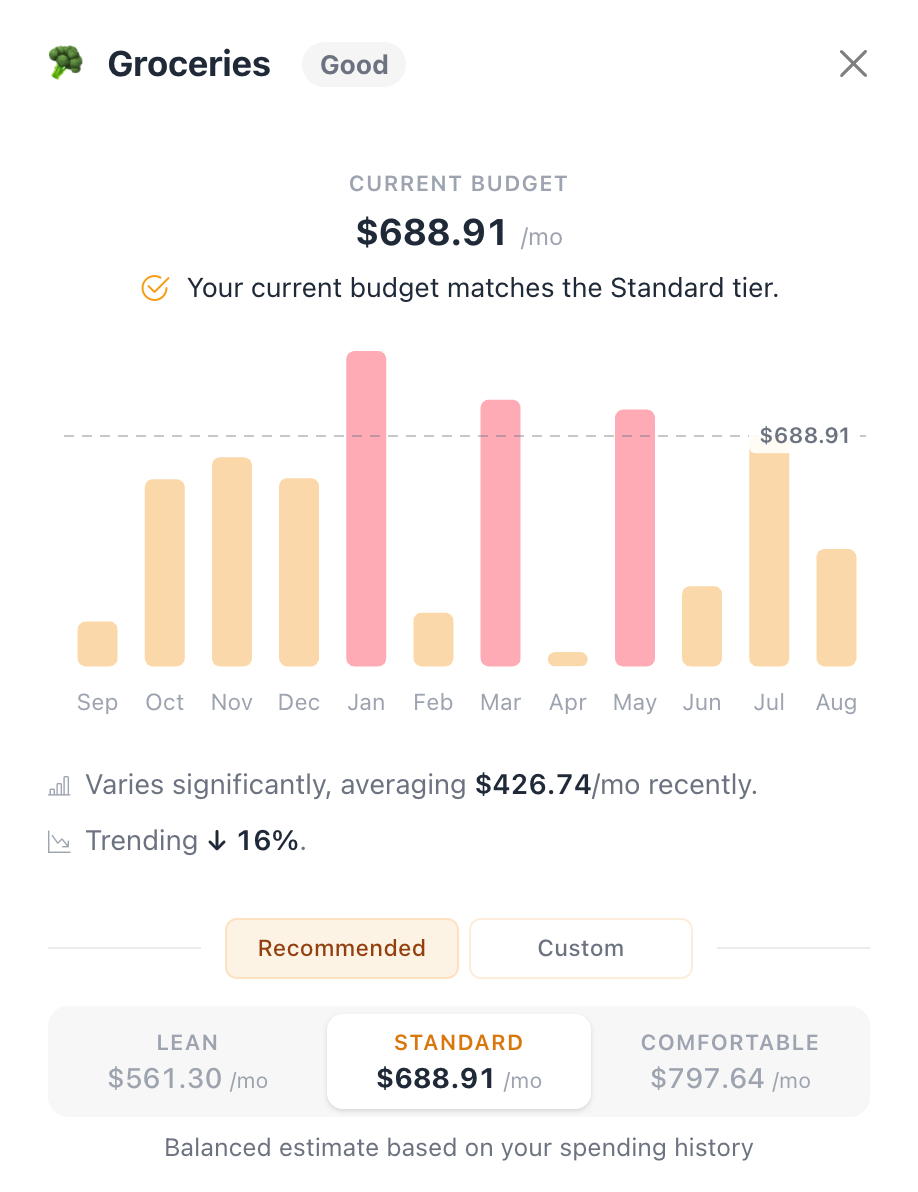
Meli uses your spending history to suggest a few realistic starting points. Pick what feels right, adjust anything you want, and you have a budget.
Meli keeps your emails, transactions, budgets, and spending history on your device, not in the cloud.
Try every Pro feature for 14 days. No card, no automatic charge. Then keep using Meli Lite for free.
Everything you need to start understanding your spending.
Older history stays stored on your Mac.
$59.99 billed annually
Let Meli do more of the work for you.
Everything in Lite, plus:
Choose Meli AI, local Ollama, or your own AI provider.
Try Pro free for 14 days. No card. No automatic charge. Then continue with Lite for free.
Paid Pro renews at $59.99 USD/year unless canceled before renewal. Keep Pro through your paid term. Refunds & cancellation terms.
Clear answers before you connect your inbox.
Talk to the developerNo. Meli does not connect to your bank or use a third-party aggregator like Plaid. It imports supported transaction alert emails from the inboxes you connect.
Gmail and Outlook use read-only OAuth2 access. Other supported providers connect through IMAP. Meli processes supported alerts locally on your Mac.
On your Mac. Meli reads supported transaction alert emails and extracts transaction details locally, not in the cloud. Optional cloud-based Smart Categorization is separate: if you enable it, the transaction details needed for suggestions are sent to your chosen AI provider.
Meli currently supports credit card transactions from the supported banks, plus Venmo and PayPal transactions. Debit card transactions and checking or savings accounts aren’t supported yet.
Meli imports purchases represented by supported alerts in your inbox. Coverage depends on the alerts you enable. It does not read account balances or backfill purchases that never appeared in an email. You can add missing transactions manually; Pro also supports scheduled transactions that repeat automatically.
No. Meli currently tracks spending on credit cards, Venmo, and PayPal. We plan to add net worth and account balance tracking in a future version.
Yes. You can add transactions manually and use Meli to organize and understand your spending, but you’ll miss out on automatic imports. If your bank sends transaction alert emails, request bank support so we can work on adding it in a future version.
We would love to support Apple Card, but unfortunately Apple doesn’t send transaction alerts via email. We’re currently working on an alternative way to import those transactions.
Only if you choose it. Smart Categorization is a Pro feature and starts disabled. Meli AI and remote custom providers process the transaction details needed for suggestions outside your Mac. Choose local Ollama to keep categorization on your Mac. You can review each suggestion or enable high-confidence auto-apply.
Your first setup starts 14 days of Pro, with no card or Meli account needed. The trial ends without a charge and Meli keeps working free as Lite. Trials are limited to one per person.
Lite gives you three months of transaction and insight history. Older data stays stored on your Mac. Pro unlocks your full imported history, unlimited rules, recurring schedules, and Smart Categorization.
Paid Pro renews at $59.99 USD per year unless you cancel before renewal. Cancel through the customer portal. You keep Pro through your paid term, then return to Lite without deleting your local data. See the refunds and cancellation policy for refund terms.
Meli requires macOS 14 or later. Optional on-device classification of unfamiliar emails requires compatible Apple silicon, Apple Intelligence enabled, and macOS 26 or later.
Meli is developed by Futur Labs LLC. Releases are Apple Developer ID signed and notarized by Apple. Learn more about Meli or contact [email protected].
Try Pro for 14 days. Keep Lite free for as long as you like.
No card or Meli account needed · macOS 14+